Have you heard about PC Sarkar, Sylvester the jester, Andrew goldenhersh, David Blaine? They are not at all my friends; they are the great magicians of the world. Magic is an art of making something that is nothing. It means creating something which does not exist or is not predicted to survive at a peculiar time. Magicians are always liked by children’s and grown up’s. People often try to copy them for what they do.
You can or cannot be a magician, but you can of course use a magician; none other than the magician of graphics, whom I call photoshop image manipulation.
Picture manipulation is a magician of graphics that can create surprising effects like to human magicians or lot more than they can create. Can a human magician create a man with goats face, pig’s tail, giraffe’s neck and stomach of hippopotamus? No, of course not but photoshop image manipulation can do that.
With photo manipulation you can generate life in all the ideas that comes in your mind. Photoshop image manipulation is not a tool of any software but it is a technique that is used to manipulate / change images to reflect the imagination of a designer.
If you notice the pictures that come to your mails being forwarded by your friends like a man with a tail or baby with a mustache then don’t be surprised. They are the after effects of image manipulation techniques.
I still remember one of the photographs I received in my mail 2 weeks before. It pictured a man with a stomach large as 10 meters, with a caption “first man to be shown in Guinness book of world records for his biggest stomach.” I was surprised to read it and thought can anyone have such a big stomach? Then I was able to understand that it was the output of a creative photo manipulation.
How better they look, the more they have efforts behind them. It is hard and tedious to work upon an image that has to be manipulated to an imaginative character or theme. You can create and generate outstanding achievements in this field of art. More that an art it is a skill none other than a god’s gift. Everything in manipulation cannot be done through software; it requires human intervention to get the things created with a various taste.
If you can be a person who has skills and confidence at creating things then you are the best person to handle this magician.
The significant note I would like to mention with this magician would be “Handle with care”. As each valuable resource has its advantages and disadvantages, so has this little chap. Manipulation though is cool to eyes may even make large problems if it is not used properly. As you can create a dog out of a cat so is the adverse effect connected to it. It can be used improperly to make scams and fake photos.
So use it to make deigns and art that never cause harm to others or hurt their feelings. An art expresses 1000, 10000 meaning; they are not described they are predicted so try to use them to be predicted better.
Article by: Abhilash
SBL - Technology People Trust
image manipulation


How to get your Photoshop clipping paths work, in 2 simple steps?
All my articles for image clipping services, the so called clipping paths services have seen change after successive months. You could have a person removed from the background, a girl traced out with her hairs minutely, you can get a cat removed from one background and placed to another, what else? Is it what a clipping paths or a background removal service mean? No!
Clipping paths services are a good part of business process that you could sell to the customer’s world wide. Their meaning and purpose change as per their clients. From Japanese to European, from Advertisements to Publication they have different meaning. Clipping paths service is the basic part of any image manipulation process, better called as a raw material for any critical task.
You need better output as image, clarity in your work or you need to project an image real; all that comes as a basic operation is the so called background removal or image clipping. When you see Bill gates holding your friends hand and that appears to you as a real photograph, it might be the skill of a Photoshop image editor. Image editor need a person to clip his images or possess the quality to clip his images using Photoshop. Whatever may be the medium to get it done, the end result is necessity.
Now how to get clipping paths done in 2 simple steps:
1. Search over the internet for a clipping paths service and find a provider.
2. Delegate your work to him and get it done in time, ensure quality and time.
These are the two necessary steps you should possess to manage large clipping jobs. Get rid of your problematic job of clipping an image from the background by following the steps above. You should have a managerial capability to have the things done and output generated in a proper manner. If you do not have the same then give it to an organization that possess some skills at managing image editing projects and has stringent quality control and quality assurance process.
If you plan to outsource your image editing jobs like image clipping, you must ensure whether it is outsourced to the right hands. Around the clock services will be provided by most of the outsourcing companies. Image outsourcing is a part of the outsourcing business and you could have your business process outsourced to one who has real expertise at it.
Follow the steps to get your Photoshop clipping paths work done without hassle.
Article By: Gayathri Babu.G
SBL – Technology People Trust
deep etching
Clipping paths services are a good part of business process that you could sell to the customer’s world wide. Their meaning and purpose change as per their clients. From Japanese to European, from Advertisements to Publication they have different meaning. Clipping paths service is the basic part of any image manipulation process, better called as a raw material for any critical task.
You need better output as image, clarity in your work or you need to project an image real; all that comes as a basic operation is the so called background removal or image clipping. When you see Bill gates holding your friends hand and that appears to you as a real photograph, it might be the skill of a Photoshop image editor. Image editor need a person to clip his images or possess the quality to clip his images using Photoshop. Whatever may be the medium to get it done, the end result is necessity.
Now how to get clipping paths done in 2 simple steps:
1. Search over the internet for a clipping paths service and find a provider.
2. Delegate your work to him and get it done in time, ensure quality and time.
These are the two necessary steps you should possess to manage large clipping jobs. Get rid of your problematic job of clipping an image from the background by following the steps above. You should have a managerial capability to have the things done and output generated in a proper manner. If you do not have the same then give it to an organization that possess some skills at managing image editing projects and has stringent quality control and quality assurance process.
If you plan to outsource your image editing jobs like image clipping, you must ensure whether it is outsourced to the right hands. Around the clock services will be provided by most of the outsourcing companies. Image outsourcing is a part of the outsourcing business and you could have your business process outsourced to one who has real expertise at it.
Follow the steps to get your Photoshop clipping paths work done without hassle.
Article By: Gayathri Babu.G
SBL – Technology People Trust
deep etching
How to make transparent background
Remove the unwanted background from your image by using Adobe photoshop.
Simple steps to clip the image
Step 1. Open the image from file menu> select the pen tool from tool box and select the path and add to path area + from menu bar . Then outline the image with pen tool or Lasso tool. Magic wand tool is also used for this but pen tool is more accurate.
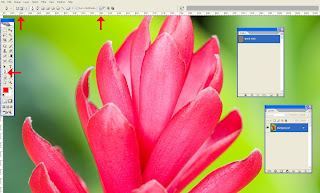
Step 2. After creating the clipping path, save the work path by double clicking on the work path or save path from path window
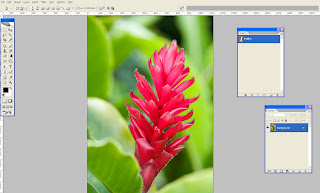
Step 3. Now we can able to select the traced path (use Ctrl + Enter or right click and make selection) and possible to move somewhere with help of move tool.
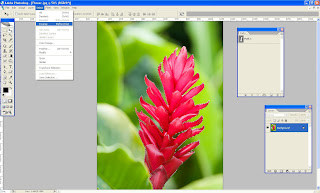
Step 4. After selecting the object go to the menu bar and select > Inverse(Shift +Ctrl + I)
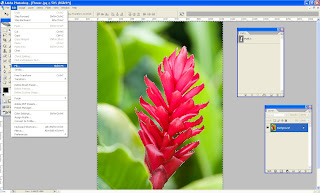
Step 5.Select the background and fill the color from Edit >fill (select background color or foreground color )
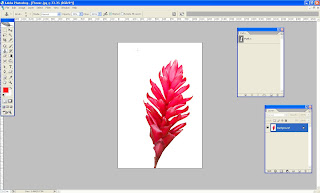
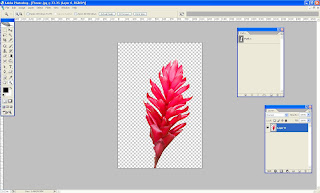
step 6. Also we can make transparent background too. When you should unlock the layer (Double click the layer on the layer pallet) and inverse the selection and finally delete the background.
Lets try ......
Tutorial By: Jinu
SBL – Technology People Trust
Deep etching
Simple steps to clip the image
Step 1. Open the image from file menu> select the pen tool from tool box and select the path and add to path area + from menu bar . Then outline the image with pen tool or Lasso tool. Magic wand tool is also used for this but pen tool is more accurate.

Step 2. After creating the clipping path, save the work path by double clicking on the work path or save path from path window

Step 3. Now we can able to select the traced path (use Ctrl + Enter or right click and make selection) and possible to move somewhere with help of move tool.

Step 4. After selecting the object go to the menu bar and select > Inverse(Shift +Ctrl + I)

Step 5.Select the background and fill the color from Edit >fill (select background color or foreground color )

step 6. Also we can make transparent background too. When you should unlock the layer (Double click the layer on the layer pallet) and inverse the selection and finally delete the background.

Lets try ......
Tutorial By: Jinu
SBL – Technology People Trust
Deep etching
Subscribe to:
Posts (Atom)
